

How to Improve Posture at the Computer When You Suffer from Back Pain After Work
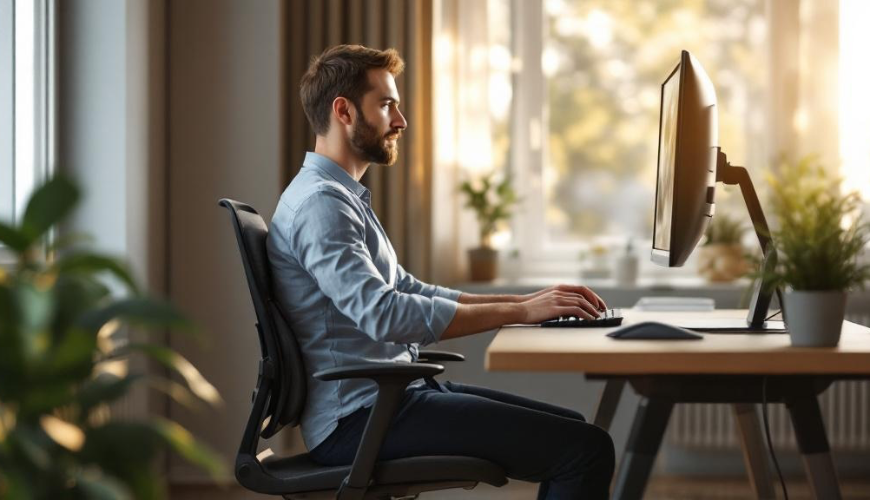
Sitting at a computer all day is a subtle routine for many: open the laptop in the morning, handle emails, one video call follows another, and before you know it, it's evening. However, the body does not perceive such "immobility" as a neutral state. It gradually starts to take its toll, most often as back pain, a stiff neck, a stabbing between the shoulder blades, or a feeling that the shoulders are "falling forward." Sometimes, a small change is enough: altering a few habits, understanding what proper posture means, and incorporating a few short movements during the day. Those looking for how to improve posture at the computer are usually not seeking perfection or athletic performance but relief and a normal, pleasant day without back strain.
This might sound familiar: after lunch, you find yourself sitting on the edge of the chair, chin protruding towards the screen, and the lower back has "disappeared." It's a natural reaction to fatigue and work pace. However, the body then holds the head and chest in a less advantageous position, and muscles that should be cooperating start to compete. It's not a matter of willpower but rather environment and small decisions. That's why tips for improving posture that are simple, realistic, and doable even between meetings make sense.
Try our natural products






Why Sitting at a Computer All Day Often Leads to Back Pain
The human body is designed for movement, changing positions, and working muscles at various angles. When it barely moves for several hours, some muscles "become lazy," while others take on extra work. Typically, the hip flexors (front of the hips) shorten, while the glutes and core tend to shut down. Add to that a chest pulled forward and shoulder blades losing support. The result is often a feeling of stiffness and overload, sometimes even back pain in the lower back or between the shoulder blades.
The head plays a role too: it's heavy, and the neck has to support it. When the chin moves forward, the demand on the neck and upper back muscles increases. It's no coincidence that many people feel burning in their trapezius muscles or pressure in the nape after a day at the monitor. It's not "weakness," it's physics and a long-term habit.
Useful context on why prolonged sitting is related to health can also be found in public institution overviews – for instance, WHO and their recommendations on physical activity and sedentary behavior. It's not about becoming an athlete overnight but understanding that the body needs regular "interruptions" from sitting to maintain good condition.
Now, the practical side: when we talk about proper posture, many people imagine a military stance, chest protruding, and shoulders rigidly pulled back. But you can't sit like that for long. Proper posture is more about balance – ensuring the body doesn't have to push one part to the limit while completely shutting down another. When achieved, it relieves the back and neck, and breathing becomes easier. It's not a minor detail: breathing and posture are more interconnected than it seems.
How to Improve Posture at the Computer Without Major Investments
It starts with the workspace. Not because one necessarily needs the most expensive chair, but because a poorly set-up desk and monitor force the body into compromises. And compromises, after a few hours, turn into habits.
A good foundation is to sit with feet stably on the ground (or on a footrest), knees roughly at a right angle, and the pelvis supported. The lower back often appreciates gentle support – sometimes a rolled-up towel or small pillow is enough to remind you of the spine's natural curve. Shoulders tend to "escape" to the ears when the desk is high or when working on a laptop without an external keyboard. Here, a simple rule helps: elbows rest comfortably while typing, and forearms are not raised.
A big topic is the monitor. When it's low, the head moves forward and down. When it's too high, the neck tilts back. Ideally, the screen should be roughly at eye level and far enough away to avoid squinting. With a laptop, a book or stand often suffices, along with a keyboard and mouse. It's one of the quickest steps to improve posture at the computer as it immediately changes the position of the head and shoulders.
Micro-ergonomics is also important – small details that add up during the day. A phone clamped between shoulder and ear, the mouse far on the table, constant twisting of the torso to the second monitor… all these are small pulls on strings that eventually tie a knot in the back. Sometimes, simply moving the mouse closer, aligning the keyboard in front of you, and placing a notepad so you don't have to constantly turn your neck to one side is enough.
Then there's the issue that ergonomics alone can't solve: even when the workspace is set up nicely, sitting at a computer all day is still sitting. The body needs a change of position. A sentence often repeated among physiotherapists captures this perfectly: "The best position is the next one." In other words – even "proper" sitting becomes a problem when it lasts too long without a break.
For those genuinely seeking tips on improving everyday functioning, a simple rhythm can be tried: every 30–60 minutes, stand up for half a minute, walk for water, straighten, and take a few deep breaths into the belly. It's not a fitness plan but rather a hygienic habit. Surprisingly often, this is what makes the biggest difference with back pain.
Real-Life Example: "I Just Raised the Laptop"
In one office, they addressed why several people were suffering from neck and shoulder pain, even though they had "pretty good" chairs. It turned out most worked all day on laptops placed on desks. The screen was low, the head moved forward, and shoulders gradually curled inward. One colleague tried a simple change: she put the laptop on a stand (in a pinch, a shoebox served the purpose), and got an external keyboard and mouse. The first few days felt unusually "straight," but within a week, she noticed her shoulders weren't as heavy in the evening, and the back pain between the shoulder blades eased. It wasn't a miracle or a cure-all, just the removal of one of the main causes.
Quick and Simple Exercises for Posture that Fit into a Workday
Exercises don't have to be long or complicated. On the contrary: the best ones are those so simple that they can be done regularly. Regularity is key for posture. If the body slouches all day and then exercises for an hour once a week, the results are uncertain. But if it returns to a better position several times a day, it gradually adopts it.
Below is a practical mini-framework that can be done at home or in the office, without changing clothes. These are quick, simple exercises for posture and small "resets" after sitting. (And yes, sometimes doing just two of them is enough.)
- Chin tuck (gently, without tension): Sit more upright, imagine the head growing upwards, and then gently tuck the chin back as if creating a "double chin." Hold for 5–10 seconds, repeat several times. Helps against protruding head.
- Chest opening in a doorway: Stand in a doorway, forearms resting on the frame, and gently move the chest forward to stretch the front of the shoulders. Breathe calmly, 20–30 seconds.
- Pulling shoulder blades down and together: Sit or stand, relax shoulders from ears, gently pull shoulder blades back and down (not tensely). Hold for a few seconds, 8–12 repetitions. It's a small movement but teaches the body support in the upper back.
- Hip stretch standing: Place one foot slightly back, tilt the pelvis (gently) to stretch the front of the hip. Hold for 20 seconds on each side. Great when it's hard to "straighten up" after long sitting.
- Brief glute activation: Stand and lightly squeeze the glutes as if trying to straighten "from the bottom." 10–15 seconds, several times. Helps so the lower back doesn't have to do everything alone.
These movements are not about "working out" a training session. They are more like signals for the body: this is the way back to balance. And when done continuously, they often change how one sits without having to think about it all day.
A simple rule also applies: if sharp pain, tingling, shooting into a limb, or worsening symptoms occur during exercise, it's better not to continue and to discuss it with a professional. Back pain has various causes, and sometimes an individual approach is needed.
Breathing is also part of the whole picture. Under stress, breathing shortens, and shoulders rise. When you slow down the inhalation through the nose and extend the exhalation, the neck often relaxes automatically. It's not esoteric, but rather a natural reaction of the nervous system. Incidentally, comprehensible views on how sitting and movement are related to health can be found in overviews like NHS recommendations on physical activity – not for "performance," but for everyday functioning.
And what if you don't have time or energy to think about exercises? Then often a small thing wins: setting a reminder to drink water, because the walk for a glass is actually a micro-break. Or having short conversations standing up. Or placing the printer (or trash bin) a few steps further. The trick is that proper posture is not achieved just by "sitting correctly," but by frequently changing position throughout the day.
It might be worth asking a simple question: when the body sits for several hours every day, why should it remain without consequences? The good news is that the body responds quickly. Once it gets better conditions and a bit of regular movement, relief often comes sooner than expected.
In an environment where a healthier lifestyle and a more sustainable home are discussed, it makes sense to also think about what is "sustainable" for the body. Sometimes it's as simple as raising the monitor, supporting the feet, relaxing the shoulders, and stretching several times a day. And when a few small habits are added – short breaks, taking the stairs, stretching hips while waiting for coffee – working at a computer becomes a bit more pleasant, calmer, and less painful. Tips for improving posture at the computer then aren't just another task on the list, but a practical investment in leaving the desk in the evening with a lighter head and back.